Five Warning Signs Heat Is Quietly Damaging Your Motor
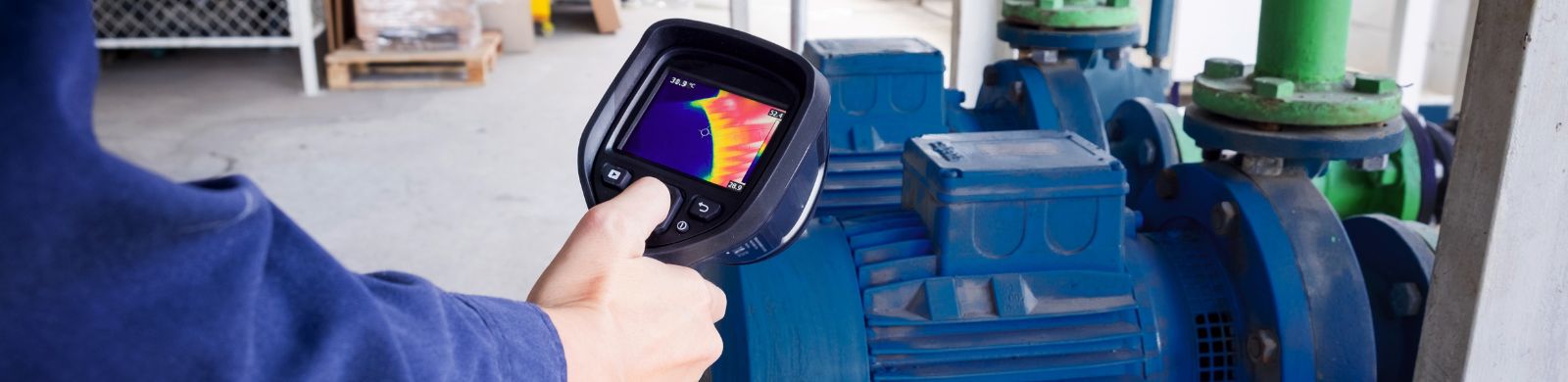
Summer places every industrial facility under additional stress. As ambient temperatures rise, cooling systems work harder; production equipment operates in warmer environments, and electric motors face greater challenges dissipating the heat they naturally generate during operation.
The problem is that motors rarely fail because of a single hot day.
Instead, excessive heat quietly accelerates wear over weeks or months, gradually affecting insulation systems, bearings, lubricants, and electrical components until what begins as a minor temperature increase eventually becomes an unexpected shutdown. In many cases, the warning signs appear long before a motor actually fails—they're simply overlooked or mistaken for normal operation.
Knowing what to look for can help maintenance teams identify developing problems before they impact production.
Here are five signs that heat may already be affecting your equipment.
1. The Motor Is Running Hotter Than It Used To
A motor running at an elevated temperature is not necessarily overheating. Electric motors generate heat during normal operation, and a single temperature reading does not necessarily indicate that a motor is operating outside its intended thermal limits. What matters is a measurable change from the motor's established operating pattern—especially when the load, ambient conditions, and operating conditions have remained relatively consistent.
One of the easiest warning signs to miss is a gradual increase in operating temperature. Because maintenance personnel see the same equipment every day, small changes may go unnoticed until they become significant.
A motor operating in a hotter environment has a smaller temperature difference between its surface and the surrounding air, making it more difficult to dissipate heat. Blocked ventilation openings, dirty cooling fins, elevated ambient temperatures, or restricted airflow can all contribute to higher operating temperatures without changing the mechanical load.
Temperature should be measured using appropriate monitoring equipment rather than assessed by touch. Infrared thermography, for example, can be used to trend equipment temperatures over time. Comparing current operating temperatures with historical readings can provide an earlier indication of a developing problem than waiting for an overload trip or bearing failure.
Quick Check
- Compare motor temperatures to previous inspections.
- Verify cooling air passages remain unobstructed.
- Confirm ventilation fans are operating correctly.
- Inspect surrounding equipment for anything restricting airflow.
2. Dirt Is Becoming an Insulator
Dust doesn't simply make equipment look dirty.
It can also prevent motors from cooling properly.
Whether it's metallic scale inside a steel mill, paper fibers in a converting operation, grain dust during harvest, or general airborne contamination in manufacturing, debris can gradually accumulate on motor housings, cooling fins, fan covers, and ventilation openings.
That buildup can act as insulation. Instead of allowing heat to dissipate effectively from the motor, contamination can interfere with cooling and contribute to higher operating temperatures and accelerated thermal aging.
That is why keeping a motor clean should be part of regular preventive maintenance—not simply something addressed when temperatures begin to rise. Dirt and debris should be kept from accumulating on cooling surfaces and around ventilation paths throughout the year.
Maintenance should also extend beyond cleaning. Lubrication and regreasing intervals should follow the recommendations in the motor's Installation and Maintenance Instructions (IOM) and reflect the requirements of the application. More grease is not necessarily better; overgreasing can create its own operating problems, so the correct lubricant, quantity, and interval matter.
Quick Check
- Inspect cooling fins and external surfaces for contamination or buildup.
- Verify fan guards and ventilation paths remain free of debris.
- Remove buildup that may restrict airflow around the motor frame.
- Follow the recommended inspection and maintenance schedule for the motor and application.
- Follow IOM recommendations for lubrication and regreasing, including the specified lubricant, quantity, and interval. Avoid overgreasing.
3. Thermal Protection Is Tripping More Frequently
An occasional overload trip may simply indicate an unusual operating condition.
Repeated thermal trips, however, deserve investigation.
Where thermal protection is incorporated into the motor or motor control system, it provides an important safeguard against excessive operating temperatures. Not every motor is supplied with the same type of thermal protection, however, so maintenance teams should first understand what protection and temperature-monitoring devices are actually installed on the application.
Temperature protection and monitoring options are also available for select Marathon® motor configurations. Through Marathon's MOD CENTRAL program, available modifications may include winding thermostats, thermistors, and RTDs, which can be used to detect excessive winding temperatures or provide temperature information to external monitoring and control equipment. Availability varies by motor design and application.
Regardless of how the system is protected, repeated trips should not simply be reset without investigating the underlying cause. Higher ambient temperatures, overloaded equipment, inadequate ventilation, voltage imbalance, frequent starts, or restricted cooling can all contribute to elevated operating temperatures that eventually trigger protective devices.
Rather than viewing nuisance trips as an inconvenience, maintenance teams should consider them valuable diagnostic information.
The protection system may be communicating that something in the application has changed.
Quick Check
- Review recent overload history.
- Compare motor current to nameplate ratings.
- Verify driven equipment isn't creating excessive load.
- Inspect ventilation systems serving electrical rooms and production equipment.
4. Heat Is Affecting Lubrication
Heat affects more than a motor's electrical components.
It can also affect the lubricant protecting its bearings.
As operating temperatures increase, grease can oxidize more quickly and lubricant life can decrease. When lubrication begins to degrade, bearings may experience increased friction, which generates additional heat and can accelerate wear—creating a cycle that puts even more thermal stress on the motor.
That is why a change in bearing temperature can be useful information. A bearing running hotter than its established normal condition does not automatically mean the bearing is failing, but it can signal that lubrication, loading, alignment, cooling, or another operating condition deserves attention.
Following the motor manufacturer's recommended lubrication practices remains important. Rather than automatically increasing lubrication frequency because ambient temperatures are higher, maintenance teams should look for changes from the motor's normal operating behavior and verify that the lubricant, quantity, and lubrication interval remain appropriate for the actual operating conditions.
Quick Check
- Compare bearing temperatures with the motor's normal operating trend.
- Watch for grease discoloration, deterioration, or leakage.
- Listen for changes in bearing noise.
- Verify that the correct lubricant is being used.
- Confirm lubrication intervals and quantities against the manufacturer's recommendations.
5. Everything Sounds Normal—But Energy Consumption Is Increasing
Perhaps the most overlooked warning sign isn't something maintenance personnel can hear or even see.
It's found in electrical data.
Motors experiencing excessive heat often operate less efficiently. Increased friction, restricted cooling, misalignment, deteriorating bearings, or overloaded conditions can all contribute to higher current draw and increased energy consumption long before noticeable mechanical symptoms appear.
Modern condition monitoring systems and motor management software make it easier than ever to trend current, power consumption, and operating temperatures together.
When these values begin changing without a corresponding increase in production demand, they often provide one of the earliest indications that maintenance intervention may be needed.
Quick Check
- Compare current draw with historical operating data.
- Investigate unexpected increases in energy consumption.
- Verify alignment and mechanical loading.
- Include electrical trends as part of predictive maintenance programs.
Heat Leaves Clues—If You Know Where to Look
Motor failures rarely happen without warning.
More often than not, excessive heat quietly leaves a trail of evidence: slightly higher temperatures, more frequent overload trips, additional dirt accumulation, changing lubrication requirements, or small increases in energy consumption. Individually, these signs may appear insignificant. Together, they tell the story of equipment operating under increasing thermal stress.
While selecting motors designed for demanding environments—such as Marathon®'s Blue Chip XRI® Severe Duty motors—can provide additional reliability in applications exposed to heat, dust, moisture, and continuous operation, even the most robust equipment benefits from regular inspection and preventive maintenance. Identifying these warning signs early allows maintenance teams to address developing issues before they become costly production interruptions.
Summer may place additional demands on industrial equipment.
But with the right inspections—and the right attention to detail—it can also become the season when reliability is strengthened rather than tested.
Quick Maintenance Checklist
☐ Cooling air passages are clean and unobstructed.
☐ Motor cooling fans are operating correctly.
☐ Surface temperatures remain consistent with previous inspections.
☐ No recurring thermal overload trips have been recorded.
☐ Bearings are properly lubricated and operating within expected temperature ranges.
☐ Current draw remains consistent with historical operating data.
☐ Maintenance practices and lubrication schedules are consistent with Marathon's Installation and Maintenance Instructions (IOM).
Need the IOM for your motor?
Find Marathon® installation and maintenance manuals on our Literature & Resources page.